Help - TwitCasting Viewer
About TwitCasting Viewer
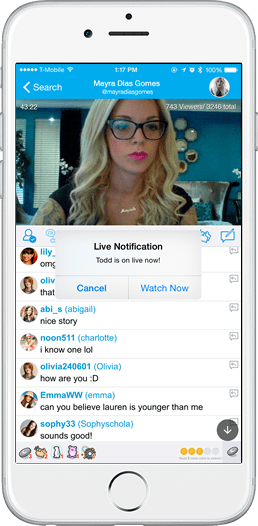
TwitCasting Viewer is an app that notifies you when your favorite user goes on live. You can watch his/her live on iPhone or iPod Touch/iPad/Android with TwitCasting Viewer.
No user registration/login is neccesary to watch live, but you need to login to leave comments. We encourage you to login and leave your comments to give good feedbacks for the live broadcasters.
How to Use Twitcasting Viewer
You'll see a search icon on the top left side of the window when you've launched TwitCasting Viewer. Click on this icon and start searching to add your favorite user. (Use menu button for Android users). Note that the search will be made by forward matching rule(ID) or partial match (name).
The added (subscribed) user will appear in your home window. When you click on the name, the viewer starts if he/she is on live.
If you are navigating twitcasting.tv web site with your iPhone/iPod Touch/iPad/Android, you will see "Show this live on App" button on the live page. You can start watching live by this link.
Notification
TwitCasting will send you a push notification when your subscribed user starts their live and posted the first message. There might be a slight gap before you actually receive the notification. Sorry in advance if you experienced that your favorite user's live had finished his/her live when you opened TwitCasting Viewer. Please note that we do not push notify your friends' live if it is protected by a secret word.
To receive a push notification, you need to have Push Notification settings to ON on your iPhone/iPod Touch/iPad.
* Note that you can turn off sound from the push notification menu on your iPhone's Settings icon.
To avoid push spam, we do not send push notification if live video is restarted within 30 minutes since last push notification.
Please Recommend
TwitCasting Viewer is designed to be the best tool to watch live and communicate with the audiences. If you see someone watching TwitCasting on browser apps, please encourage to install TwitCasting Viewer. Unlike TwitCasting Live, this application does not require Twitter account, and works on the iPhone and iPod Touch/iPad.
* Note: the specification about the timing of push notification may change in the future.